
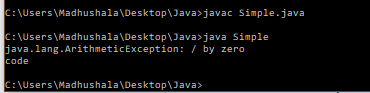
Java allows you to use more than one catch block that must be followed after the try block. Also, every catch block should have a different exception handler to handle different type of exceptions raised. If there are two or more catch block having the same exception handler then the JVM will get confused with block to execute and will result in an error. At a time only one catch block will get executed. All the catch block should be ordered with a particular exception handler. Example
import java.util.regex.*;
public class Simple{
public static void main(String args[]){
try{
      int data=100/0;
  }
catch(ArithmeticException e)
        {
            System.out.println(e);
        }
 catch(ArrayIndexOutOfBoundsException e)
                  {
                   System.out.println("ArrayIndexOutOfBounds");
                  }
               catch(Exception e)
                  {
                   System.out.println("Parent Exception");
                  }
               System.out.println("code");
}
 }
Output
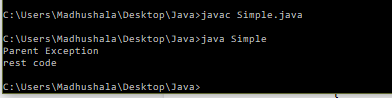
Example
import java.util.regex.*;
public class Simple{
public static void main(String args[]){
try{
                String s=null;
                System.out.println(s.length());
               }
               catch(ArithmeticException e)
                  {
                   System.out.println("Arithmetic Exception");
                  }
               catch(ArrayIndexOutOfBoundsException e)
                  {
                   System.out.println("ArrayIndexOutOfBounds Exception");
                  }
               catch(Exception e)
                  {
                   System.out.println("Parent Exception");
                  }
               System.out.println("rest code");
    }
}
Output
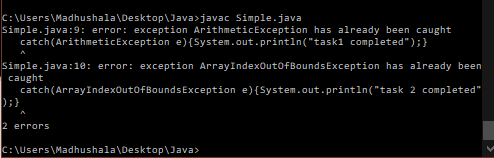
Example without any exception handling order
import java.util.regex.*;
public class Simple{
public static void main(String args[]){
 try{
    int a[]=new int[10];
    a[10]=30/0;
   }
   catch(Exception e){System.out.println("completed");}
   catch(ArithmeticException e){System.out.println("task1 completed");}
   catch(ArrayIndexOutOfBoundsException e){System.out.println("task 2 completed");}
   System.out.println("rest code");
 }
}
Output
People are also reading:
- What is Java Runtime Environment (JRE)?
- Kotlin vs Java
- Java vs Other Programming Languages
- Popular Java Frameworks
- How to set a path in Java?
- While Loop in Java
- Java Finally block
- Encode Java String to send Web Server URL
- Java Square


