
Though computers have become essential gadgets in our everyday life, many of us are not aware of their components and structure. Also, many do not know its underlying mechanisms and processes. One of the easiest ways to understand them is by going through the block diagram of a computer.
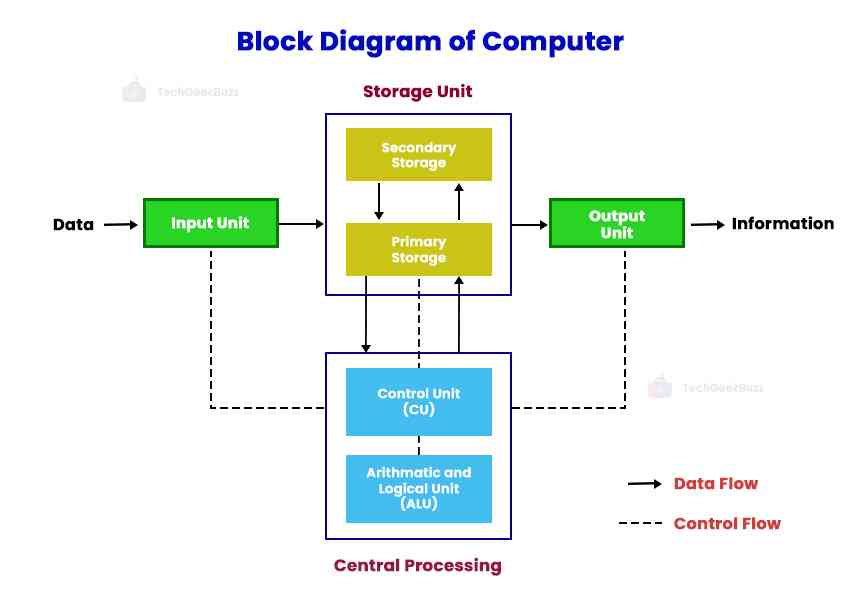
A block diagram of a computer is a structural representation of all its components. It also depicts the entire working of a computer system, from accepting user input to displaying the intended output.
The three major components – the input unit, central processing unit, and output unit – make up a computer system. They perform the basic functions of a computer – accepting input, processing it, displaying the output, and storing the results.
In this blog post, we shall explore the block diagram of a computer and know how exactly a computer system works.
So, let us get started!
Block Diagram of a Computer: A Detailed Working of a Computer
Let us discuss each component of a computer system in detail below.
1. Input Unit
Without input data, a computer cannot generate any results. This is where the role of the input unit comes into play.
The input unit accepts the data or instructions from a user through several input devices , such as a keyboard, mouse, joystick, etc. When the user provides input to a computer system using a specific input device, it converts the input into a format that the computer can understand and process.
A computer basically accepts input in a binary format , i.e., in the form of 0s and 1s. Further, it processes the input and generates the desired output.
Hence, the input unit acts as an interface between users and computer systems. In other words, it is a communication medium between users and computers.
Major Functions
- Collect data from users for processing.
- Convert the raw data into the binary (machine-readable) format.
- Transmit the transformed input to the CPU’s main memory.
2. Central Processing Unit (CPU)
Commonly known as the brain of a computer, the CPU, or central processing unit, is responsible for processing the input, specifically a set of instructions, provided by users. It regulates all computer activities, just as the human brain controls all human activities.
The CPU is a complex ecosystem of electronic circuitry that makes the computer’s operating system and other applications work. It accepts the input from the input unit and interprets, processes, and executes it.
Major Functions
- Controls a computer’s operating system, other software applications, and data processing.
- Accepts input from different input devices, processes it, and displays the output on output devices.
- Performs arithmetic and logical operations.
Like a computer has three major components, a CPU also has the same. They are as follows –
a. Arithmetic and Logic Unit (ALU)
ALU performs arithmetic and logical operations. It has two units – arithmetic and logic units.
Arithmetic Unit: It carries out arithmetic operations – addition, subtraction, multiplication, and division.
Logic Unit: It manages the execution of logical operations involving selection, comparing, matching, merging, etc. Logical operations include AND, OR, NOT, and combinations of these operations.
Initially, the input is stored in the main memory . If ALU requires the input, the control unit (CU) passes it from the main memory to ALU. After the ALU processes the data, the control unit transmits the results to the storage unit for storage or further processing.
b. Control Unit (CU)
Also known as the brain of the CPU, the control unit (CU) regulates all the activities and operations of the processor. It instructs ALU and the memory unit on how to respond to user inputs or instructions.
Along with ALU and memory unit, the control unit monitors input and output devices and other peripheral devices connected to a computer. It is responsible for managing the data flow between the CPU and other devices.
The control unit is a supervisor that decides the sequence of operations a computer will execute. It receives instructions from the memory unit and converts them into control signals. These signals instruct the computer to prioritize and schedule different operations and activities.
Major Functions
- Regulates all other units of a computer.
- Responsible for data flow between different units of a computer and other peripheral devices.
- Accepts the input from the memory unit, understands and interprets it, and instructs the computer to do accordingly.
c. Memory Unit
The memory unit stores the data or instructions (input) that need to be processed and also the results of processing. It serves as a data repository and transmits the required data to the other units as and when required.
It consists of two parts – primary memory and secondary memory . Let us discuss them in detail below.
Primary Memory: Primary memory is a volatile memory that stores data temporarily. If the computer disconnects from the power supply, the data stored in the primary memory gets lost. It stores the user input and immediate computation results, enabling the CPU to fetch them easily and quickly. Random Access Memory (RAM) is an example of primary memory.
Secondary Memory: Because primary memory has a lower storage capacity, secondary memory comes in handy. Secondary memory is a non-volatile memory that stores data permanently. It does not lose data even if the computer shuts down or the power cuts off. It is also referred to as permanent memory or auxiliary memory. A hard disk is an example of secondary memory.
Major Functions
- Stores data and instructions that need to be processed.
- Stores the immediate result of any calculation or task performed.
- Serves as a data repository.
- Holds the final result of processing before it is displayed to users through output devices.
Explore in detail - CPU Architecture
3. Output Unit
The last component is the output unit used to display the output generated by the processor. It comprises several output devices , such as a monitor, printer, speaker, headphones, etc.
After the processor generates the output, it stores it in the main memory. Later, the out device converts the output in binary form into human-readable format. Based on the type of output device, users receive the data either in a soft copy or hard copy.
Major Functions
- Accepts the processed data or information in binary format from the processor’s main memory.
- Converts binary information into human-readable form.
Types of Computer Memory
Computer memory is the component responsible for storing data, instructions, and processing information. It enables the computer to perform operations efficiently by providing quick access to required resources. Memory can be temporary or permanent depending on how the data is stored and retained.
1. Primary Memory (Main Memory)
Primary memory refers to the memory directly accessed by the Central Processing Unit (CPU). It stores data and instructions currently being used by the system. Since the CPU can access this memory quickly, it plays a major role in overall computer performance.
Primary memory is generally faster but offers limited storage capacity compared to secondary memory.
RAM (Random Access Memory)
RAM is a volatile memory that temporarily stores data required by active applications and processes. When the computer is turned off, all information stored in RAM is erased.
Features of RAM:
- Fast data access speed
- Temporary storage
- Supports multitasking
- Improves system responsiveness
Example:
When you open a browser, edit a document, or run software, the data is loaded into RAM for quick processing.
ROM (Read-Only Memory)
ROM is non-volatile memory used to store essential startup instructions required to boot the computer. Unlike RAM, ROM retains data even after the system is powered off.
Features of ROM:
- Permanent storage of firmware
- Retains information without electricity
- Supports system initialization
Example:
The BIOS or firmware stored in ROM helps the computer start and load the operating system.
Cache Memory
Cache memory is an ultra-fast memory located close to or inside the CPU. It stores frequently accessed instructions and data to reduce processing delays.
Features of Cache Memory:
- Extremely high speed
- Small storage capacity
- Reduces CPU access time
- Improves processing performance
Example:
When repeatedly opening commonly used applications, cache helps retrieve information faster.
2. Secondary Memory (Auxiliary Memory)
Secondary memory is used for long-term storage of files, applications, and operating systems. Unlike primary memory, it retains data permanently even when power is turned off.
Secondary memory provides larger storage capacity but operates at slower speeds than primary memory.
Hard Disk Drive (HDD)
HDD stores data using magnetic disks and is commonly used for large-scale storage.
Features:
- Large storage capacity
- Cost-effective
- Suitable for long-term storage
Solid State Drive (SSD)
SSD stores data using flash memory technology and delivers significantly faster performance than HDD.
Features:
- Faster boot times
- Better durability
- Lower power consumption
Optical Storage
Optical storage devices use lasers to read and write data.
Examples:
- CD
- DVD
- Blu-ray Disc
USB Flash Drive and Memory Cards
Portable storage devices that allow users to transfer and store data conveniently.
Examples:
- Pen drives
- SD cards
- External storage devices
Why Computer Memory Is Important
Computer memory directly affects system performance, processing speed, multitasking ability, and storage capacity. Faster memory allows quicker execution of tasks, while larger storage enables users to save more files and applications.
Conclusion
This was all about the block diagram of a computer and its working. CPU, the brain of the computer, controls all its activities and operations. It manages the computer’s operating system and other installed applications. Furthermore, the input unit accepts input or instructions from users, and the output unit displays the results of the processed input.
In short, a computer accepts input, processes it, displays the result, and stores the result for future use. This is how a computer works.
We hope now you have a clear understanding of different computer components and their functions. If you have any queries, let us know in the comments.
People are also reading:
![What is an Assembler? [Definition, Working, & Types]](https://techgeekbuzz.s3.ap-south-1.amazonaws.com/media/new_post_images/What_is_Assembler.jpg)
![What is I/O? [Types, Examples, & Methods]](https://techgeekbuzz.s3.ap-south-1.amazonaws.com/media/new_post_images/What_is_I_O.webp)